
Teable Artifacts Create and Share HTML Reports with AI

Turn Teable data into a shareable HTML report: ask AI for a visual Artifact, refine it in the same conversation, and publish the result with a link.
A Teable Artifact is a presentation-focused HTML document generated from your data. Ask Teable AI to create a report, chart, summary, or comparison, then open the result directly from the chat. Unlike a database view or an App Builder app, an Artifact is designed to be read, edited quickly, and shared outside the workspace.
To use an Artifact, open a Teable table, describe the outcome you want in the AI chat, and ask for a report or visual summary. Review the generated HTML, then request focused changes such as a new chart, a different grouping, or a shorter executive view. Copy one of these prompts to get started:
- Artifact create a Q3 sales performance report with KPIs and charts.
- Artifact turn this project data into a weekly status page with risks and next actions.
- Artifact summarize this customer feedback and group it by theme.
- Artifact compare this quarter with last quarter and explain the biggest changes.
App Builder is for constructing a dynamic website or business app that people use as an ongoing system. An Artifact is an HTML, presentation-style result for reading, sharing, and fast edits. The two formats can work together: use an app for ongoing operations, and an Artifact for a polished snapshot you can circulate quickly.
To manage saved Artifacts, open the chat composer’s + menu in the lower-left, choose More, and select Manage artifacts. Each update is saved as a new version, so you can review or restore earlier results.
The video demo starts with a 40-record Sales Pipeline and a request for a Q3 performance report. The generated Artifact surfaces example metrics such as $1.569M won revenue from 12 deals, a 66.7% closed-deal win rate, a $2.232M open pipeline, and a $1.477M weighted forecast. These are values from the demo dataset, not a benchmark. You can ask for focused changes, compare versions, and share the HTML result outside Teable. Sharing supports a public link, access limited to space members, or password protection.
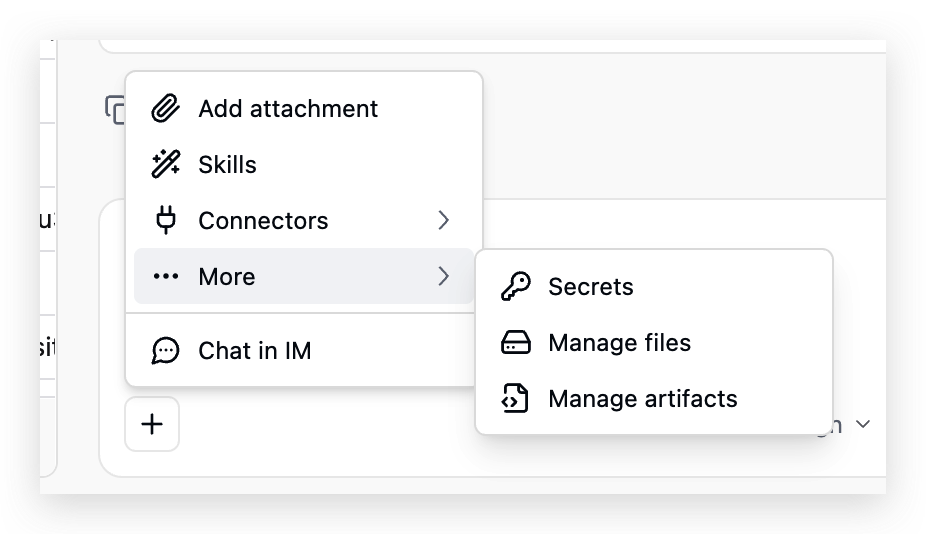
This screenshot shows where to manage saved Artifacts: open the + menu in the lower-left of the AI input, choose More, and select Manage artifacts.


