CompareBaserow Alternative

Baserow Alternative: Teable vs Baserow

Looking for a Baserow alternative? Compare Teable vs Baserow. Teable turns your data into AI workflows and custom apps tailored to your business.

Teable logoTeable

The AI spreadsheet to run your business

Bring business data and files into a live workspace
Teable AI controls the whole workspace
AI Field makes business data ready for action
Automate operations and email follow-ups
Build custom apps on live data
vs
Baserow logoBaserow

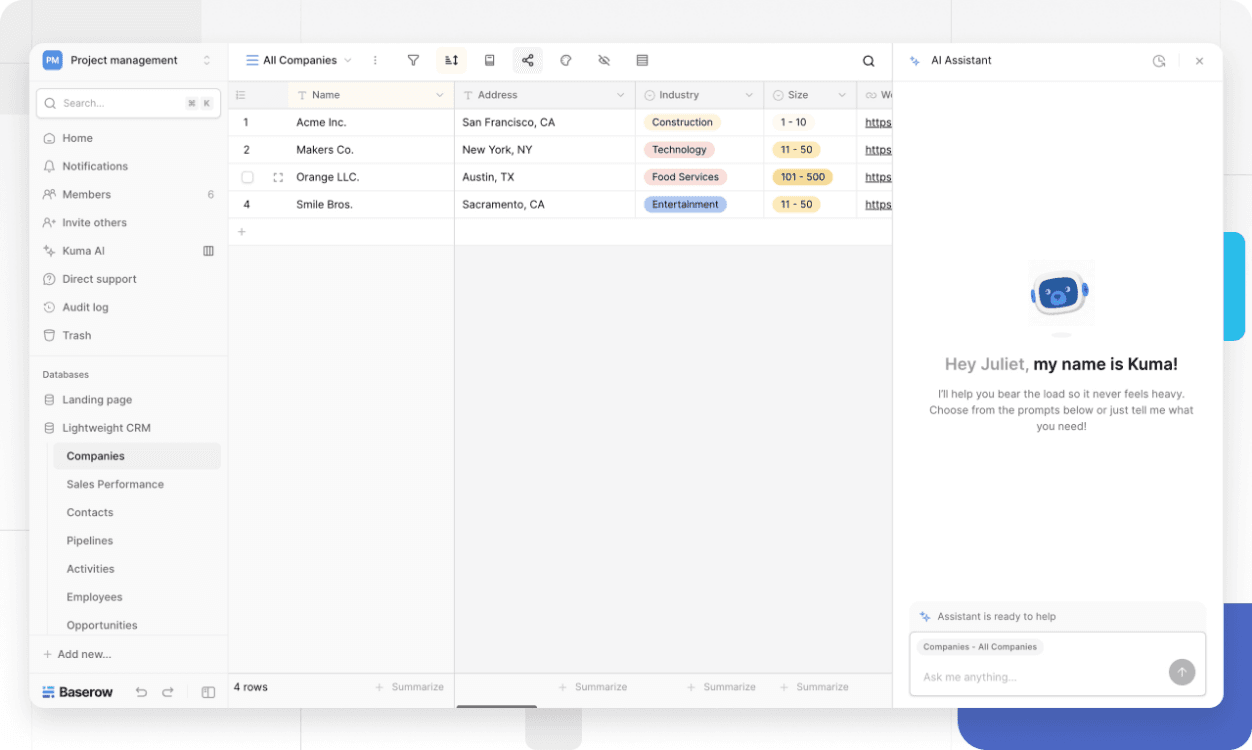
Manage online database tables, then manually configure views, forms, automations, integrations, permissions, and apps around the database.

Baserow is an online database platform for creating tables, views, forms, dashboards, apps, and automations. That works when the main job is organizing structured data in a no-code database. Teable starts from the same familiar spreadsheet-database surface, then turns business data into AI fields, AI workflows, super automations, custom apps, dashboards, and business-aware emails. Choosing between them depends on whether your team needs another online database, or an AI spreadsheet for business that turns data into operations.

Teable logo

What is Teable?

Teable is the AI Spreadsheet for Business. Teams can connect and migrate data from any system into one place, upgrade their operations, and build a true AI business data hub for AI workflows and custom apps that 100% fit your business, helping your team become truly AI-native.

Teable offers leading AI agent technology and a best-in-class user experience. Simply by chatting with Teable AI, users can work with complex Excel, CSV, and PDF files, configure tables and fields, analyze data, and build automations and custom apps across the entire workspace—with AI that understands real business context and takes action.

Baserow logo

What is Baserow?

Baserow is a no-code online database. Teams use it to create tables, views, forms, dashboards, apps, automations, and self-hosted or cloud data workspaces.

The product is centered on database building and data collaboration. Teable is stronger when the team wants business data to become AI fields, automations, custom apps, dashboards, email agents, and self-hostable operations.

Why Teable is the stronger Baserow alternative

Capability
Teable logoTeable
Baserow logoBaserow

Core product

AI spreadsheet for business that can start from existing data or build from scratch with Teable AI
No-code online database
Teable AI operates across the whole workspace: records, tables, fields, views, SQL, files, apps, automations, scripts, integrations, and migration
Separate AI tools, not one workspace Agent
Native AI Field with source fields, prompts, model settings, and batch AI fill
LimitedAI Field stays separate from wider operations
Super automations and context-driven email agents run from live records and business context
LimitedAI runs inside configured automation nodes
Build real apps on live Teable data
LimitedManually assembled database apps
Open-core and fully featured when self-hosted, including automations and all AI capabilities.
LimitedOpen-core with cloud and self-hosting, but Premium and Enterprise features require paid licenses
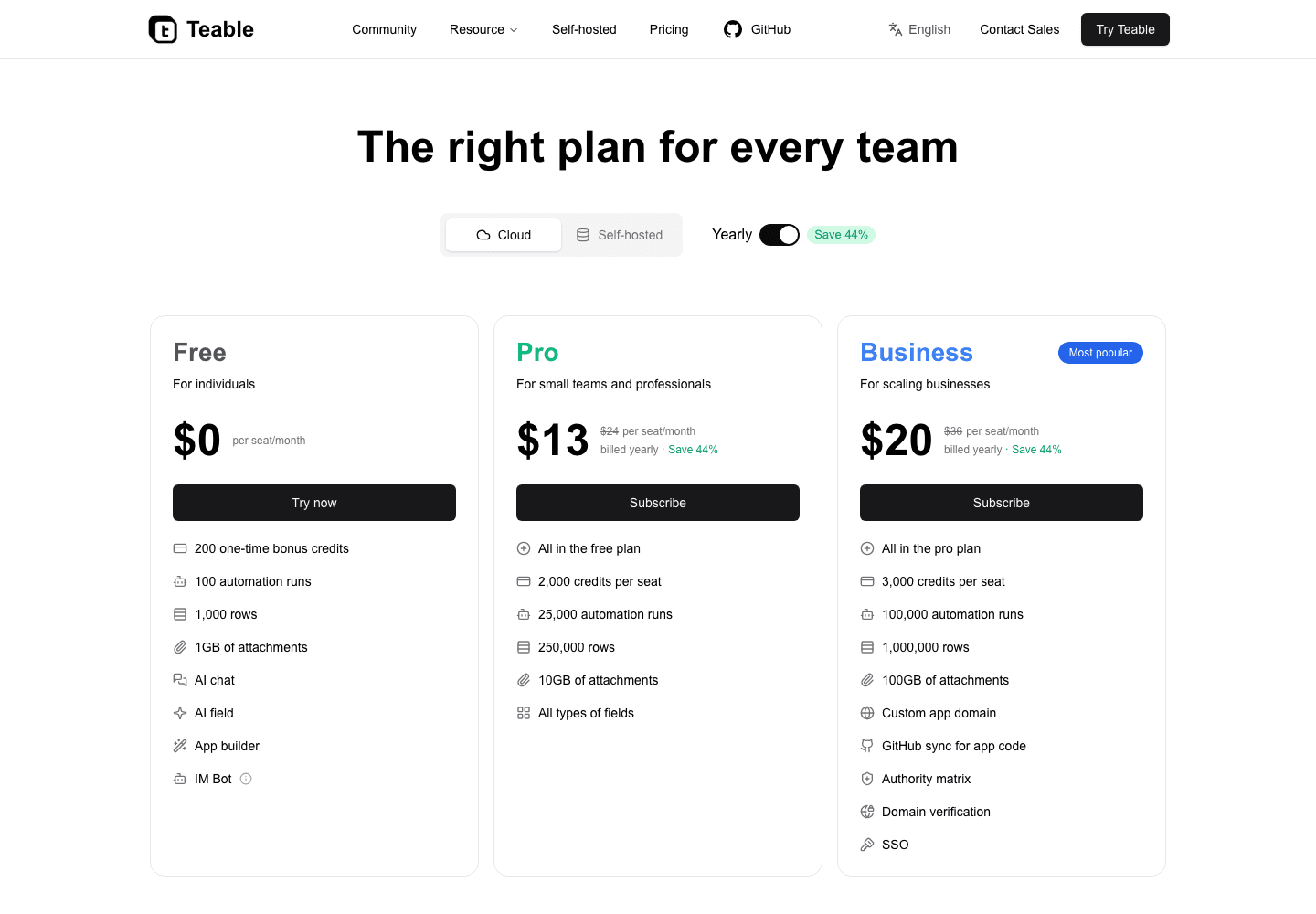
Pro $10 includes 250K rows; Business $20 includes 1M rows plus AI Field, App Builder, automations, and email agents
Limited$10 includes 50K rows; 1M rows need an Enterprise quote

Agent control

Capability
Teable logoTeable
Baserow logoBaserow

Agent scope

Teable AI operates across the whole workspace: records, tables, fields, views, SQL, files, apps, automations, scripts, integrations, and migration
AI stays split across separate product surfaces

Field control

Configure fields, add AI fields, resolve source fields, and run batch AI fill from record context
LimitedField work remains database-configured

Complex tasks

Handle complex spreadsheet files, PDFs, migration, classification, extraction, and enrichment
LimitedComplex business work needs more setup

Workspace creation

Ask Teable AI to build the workspace structure, views, apps, automations, scripts, and next actions
LimitedWorkspace structure is built manually

AI Agent in messaging apps

Use Teable AI in chat and messaging workflows for team operations
No native Baserow Agent that operates databases from messaging apps
Teable logo

Teable

Teable AI is designed to operate the workspace itself. It can update records, configure fields, build views, generate apps, shape automations, prepare scripts, run AI fill tasks, and create business email actions from live context.

  • Use Teable AI to build structure and workflow around records, not just manage database tables.
  • Use AI Field for summaries, tags, scores, extraction, translation, generated content, and workflow signals.
  • Use AI Chat to process files and long-running data tasks, then turn the result into usable workspace structure.
Baserow logo

Baserow

Baserow keeps the workspace closer to no-code database setup. Teams still do more of the AI, app, automation, and business workflow setup around the database.

  • AI is less central to workspace creation and operation.
  • Business context has to be wired around tables, views, forms, apps, automations, and external workflow tools.
  • AI output still needs another layer to become apps, dashboards, emails, and operational next steps.

AI fields and field control

Capability
Teable logoTeable
Baserow logoBaserow

AI field work

Summaries, tags, scores, translations, extracted values, generated content, and workflow signals
LimitedAI Field remains a separate data feature

AI fill control

Run AI fill for one cell, a batch, empty cells only, or records visible in a view
LimitedAI generation is configured per field

Field configuration

Ask Teable AI to configure fields with source fields, prompts, AI config, and workflow context
LimitedField setup remains manual

From result to action

Feed AI field results into automations, dashboards, apps, email follow-ups, and next actions
LimitedBroader actions need automation setup
Teable logo

Teable

Teable AI Field turns columns into workflow engines. It can summarize, classify, extract, score, translate, and generate content from live records, then pass the result into automations and apps.

  • Configure AI fields with source fields, prompts, model choices, and business context.
  • Trigger AI fill for single cells, batches, empty cells, or records visible in a view.
  • Use AI field output inside dashboards, reports, follow-up emails, apps, and automations.
Baserow logo

Baserow

Baserow gives teams a no-code database. Teable makes AI Field part of how business workflows run.

  • AI enrichment needs more setup outside the database.
  • AI-generated values are less directly tied to apps, automations, and email workflows.
  • File processing and long-running AI tasks are not the center of the database model.

Super automation and email agents

Capability
Teable logoTeable
Baserow logoBaserow

Build method

Describe the business process and let Teable AI shape tables, fields, triggers, scripts, and workflow actions
LimitedAI remains one automation node

Run context

Automations use live records, owners, status, files, AI field output, run history, and business context
LimitedContext must be configured around the workflow

Email agents

Generate and send personalized follow-up emails in bulk using customer data and business context
LimitedEmail remains a configured workflow action

Workflow examples

Contract reminders, weekly reports, Slack updates, approvals, onboarding, invoices, renewals, and customer follow-ups
LimitedEach process needs separate configuration

Business output

Write results back to records, dashboards, apps, approvals, email agents, and next actions
LimitedOutputs remain inside configured workflows
Teable logo

Teable

Teable Super Automation is record-aware. It can run reminders, reports, approvals, Slack updates, webhooks, scripts, emails, and AI steps from the same live records that power apps and dashboards.

  • Build event-driven or scheduled workflows around live Teable records.
  • Use script actions, HTTP requests, Slack or webhook integrations, email actions, and AI steps.
  • Run business-aware email agents from customer data, business context, personal inboxes, and unsubscribe links.
Baserow logo

Baserow

Baserow can organize structured data. Teable is stronger when the workflow needs to act on that data, enrich it with AI, produce apps and dashboards, and send personalized emails from the same context.

  • Automation is more tied to configured rules and connected tools.
  • Email and app output need more surrounding setup.
  • The operating record, AI output, app view, and email action are less unified than in Teable.

Business-fit custom apps

Capability
Teable logoTeable
Baserow logoBaserow

App generation

Build custom apps on live data with Teable AI and App Builder
LimitedApps are assembled from database components

App types

Dashboards, portals, approval apps, booking pages, CRUD tools, calculators, and internal apps
LimitedApp experiences need manual assembly

Live operations

Apps read and write live records, fields, files, permissions, AI fields, automations, dashboards, and email actions
LimitedApp behavior remains database-configured

Business fit

Add login, custom domains, integrations, and workflow-specific behavior without moving data out of Teable
LimitedCustom behavior needs manual configuration
Teable logo

Teable

Teable App Builder lets teams describe an app and generate it directly on live business data. The app stays connected to records, AI fields, automations, permissions, dashboards, and email actions, so it can run real business workflows instead of only presenting database tables.

  • Build custom apps on live data with Teable AI and App Builder.
  • Build dashboards, portals, approval apps, booking pages, CRUD tools, calculators, and internal apps.
  • Preview changes with Teable AI while keeping apps connected to AI fields, automations, dashboards, email actions, and the same live business data.
Baserow logo

Baserow

Baserow gives teams database apps and interfaces. Teable gives teams an app layer that can be generated from live business data and kept connected to AI, automation, dashboards, and email workflows.

  • Database apps are not the same as AI-generated apps that can run the business.
  • Teams need more external structure for branded portals, internal tools, and workflow apps.
  • When the business process changes, app logic and database logic can drift apart.

Open-core and self-hosting

Capability
Teable logoTeable
Baserow logoBaserow

Deployment path

Open-core and fully featured when self-hosted, including automations and all AI capabilities.
LimitedOpen-core with cloud and self-hosting, but Premium and Enterprise features require paid licenses

AI control

AI Gateway, AI fields, model choices, automation models, and self-hosted credit economics
LimitedAI and advanced features depend on paid self-hosted licenses

Business apps

Generate custom apps, portals, dashboards, and workflow tools from live tables
LimitedBusiness apps need more structure around the database platform

Operations layer

Automations, AI fields, dashboards, apps, approvals, email workflows, and reports stay connected
LimitedThe data interface and operations layer are less unified
Teable logo

Teable

Teable is open-core and fully featured when self-hosted, including its AI, automation, app, dashboard, and email workflow layers.

  • Use cloud or self-hosted Teable depending on data ownership and infrastructure needs.
  • Let AI agents operate on records, fields, views, files, SQL, automations, scripts, apps, integrations, and emails.
  • Build business apps, automations, dashboards, and emails directly on the same live data layer.
Baserow logo

Baserow

Baserow is open-core and supports self-hosting, but Premium and Enterprise capabilities still require paid licenses. Teable self-hosting includes automations and all AI capabilities.

  • The open-source edition is MIT-licensed, while Premium and Enterprise code uses commercial licenses.
  • Premium features require a paid per-user license even when Baserow is self-hosted.
  • Teable keeps its complete AI and automation layer available in self-hosted deployments.

Pricing and value

Capability
Teable logoTeable
Baserow logoBaserow

$10 plan value

$10 Pro: 250K rows
Limited$10 Premium: 50K rows

1M-row value

$20 Business: 1M rows
Limited$18 Advanced: 250K rows; 1M rows require an Enterprise quote

Included AI value

AI Field, AI Chat, App Builder
LimitedAI features depend on the plan and do not operate the whole workspace

Operations value

One workspace for records, AI Field, automations, apps, dashboards, email agents, and self-hosting
LimitedPaid plans still provide a database workspace; teams configure apps, automations, and email workflows around it
Teable logo

Teable

Teable's pricing advantage is clear at the paid tiers. At $10, Teable Pro gives 250K rows while Baserow Premium lists 50K rows. For larger databases, Teable publishes a Business price, while Baserow lists 1M rows under Enterprise, which means talking to sales for a quote.

  • Pro is $10 per seat/month and Business is $20 per seat/month on annual plans.
  • Business includes 1M rows, 100GB attachments, 100K automation runs, and 2,000 credits per seat/month.
  • Use one workspace for the database, AI, app, automation, dashboard, and email workflow layer.
Baserow logo

Baserow

Baserow's public paid plans are close in seat price, but lower in row capacity at comparable tiers. Once a team needs 1M rows, Baserow moves into Enterprise pricing, so the buying process becomes less self-serve.

  • Premium is $10 per user/month on annual plans and includes 50K rows per workspace.
  • Advanced is $18 per user/month on annual plans and includes 250K rows per workspace.
  • Enterprise is on request and lists 1M rows per workspace.
  • Teams still need to decide how to build AI workflows, email workflows, and operations around the database.

How to move from Baserow to Teable

Use the Connect Everything skill when Teable AI can reach the source, or import CSV exports and Excel files through Add from other sources.

Option 1

Use the Connect Everything skill

  1. 1Tell Teable AI what Baserow data you want to move into Teable.
  2. 2Paste connection details if Teable AI asks for them.
  3. 3Review the tables, fields, and mappings before import.
  4. 4Use Teable AI to configure views, AI fields, automations, dashboards, apps, and email agents after import.
Option 2

Import exported CSV or Excel files

  1. 1Export the Baserow tables you want to move, or prepare CSV or Excel files.
  2. 2Open Add from other sources, upload the files, and review detected sheets, columns, field types, and mappings.
  3. 3Import the rows into Teable as typed fields and live records.
  4. 4Use Teable AI to turn the imported data into AI fields, automations, dashboards, apps, and email agents.

Connect Everything is the AI path for reachable sources. For file-based moves, use Add from other sources with CSV or Excel files.

Baserow users usually ask

Is Teable a Baserow alternative?

Yes. Teable can replace Baserow-style database work when the team wants live business data, AI fields, AI agents, automations, apps, dashboards, and email workflows in one AI spreadsheet for business.

What is the main difference between Teable and Baserow?

Baserow is centered on online database building. Teable starts with business data and turns it into AI workflows, custom apps, dashboards, automations, and business-aware emails.

When should a team choose Teable over Baserow?

Choose Teable when database records need to become repeatable operations: AI fields, automations, approvals, reports, custom apps, dashboards, portals, and personalized follow-up emails.

Can Teable migrate Baserow data?

Yes. Teams can use the Connect Everything skill when Teable AI can reach the source, or import CSV and Excel files through Add from other sources. Teable AI can then structure the data for fields, AI fields, views, automations, dashboards, apps, and email agents.

Does Teable support self-hosting like Baserow?

Yes. Teable is open-core and fully featured when self-hosted, including automations and all AI capabilities. AI fields, AI agents, App Builder, dashboards, and email workflows stay in the same workspace.

Can Teable AI configure fields?

Yes. Teable AI can configure fields, set up AI fields, resolve source fields, and run AI fill for single cells, batches, empty cells, or records visible in a view.

Can Teable build apps from database records?

Yes. Teable App Builder can generate dashboards, portals, forms, approval tools, CRUD apps, internal tools, booking pages, and business apps directly from live Teable tables.

Can Teable build automations from natural language?

Yes. Teams can describe a workflow and use Teable AI to shape tables, fields, triggers, scripts, email actions, Slack or webhook actions, dashboards, apps, and next steps around live records.

Can Teable handle business email workflows?

Yes. Teable can generate and send personalized follow-up emails in bulk using customer data, business context, personal inboxes, and unsubscribe links.

Is Teable cheaper than Baserow?

For larger business data, Teable gives more capacity at a clear price. Teable Business is $20 per seat/month with 1M rows. Baserow Premium is $10 with 50K rows, Advanced is $18 with 250K rows, and Enterprise lists 1M rows on request.

Who should move from Baserow to Teable?

Teams should move when they need more than an online database: AI fields, agents, data migration, automations, custom apps, dashboards, email workflows, and a self-hosted path in one workspace.

Move from Baserow to Teable

Turn your data into AI workflows and custom apps that 100% fit your business.

github logologoyoutube logolinkedin logo
© 2026 Teable AI, Inc.