
Teable is now on your phone.Get the app
CompareGoogle Sheets Alternative

A Google Sheets alternative for customer operations

Compare Teable as a Google Sheets alternative for customer operations. Review linked records, Gemini and canvas, team permissions, costs, and data import.

Free cloud plan available. AI credits and usage quotas apply.

Teable vs Google Sheets: what changes for your team

Google Sheets combines collaborative spreadsheets, Gemini, and interactive canvas interfaces. Compare how the team maintains related customers, orders, and follow-ups across the complete workflow.

Data structure

TeableLinked tables with typed fields and record relationships

Google SheetsSpreadsheet tabs, formulas, and tables

Team interface

TeableApp Builder creates apps around business data

Google SheetsGrid editing and Sheets canvas on eligible plans

AI assistance

TeableAI Chat, AI fields, and App Builder

Google SheetsGemini helps build, edit, and analyze spreadsheets

Automation

TeableRecord-based automation and workflow actions

Google SheetsApps Script extends Sheets and connects services

Access model

TeablePermissions around shared business data and apps

Google SheetsSpreadsheet sharing; canvas inherits spreadsheet access

Deployment

TeableCloud or self-hosted; self-hosted App Builder Business+

Google SheetsGoogle-managed cloud service

Include your existing Workspace subscription and the specific Gemini features you need in the comparison. View sources

Link the customer, order, and next action

Teable

Teable links each customer to related orders and activities. Teams can work in views or apps built around those records, keeping the customer identifier and follow-up history consistent.

Google Sheets

Sheets is useful for collaborative analysis, shared trackers, and formula-based work. Teams can also build on the familiar Workspace sharing and comment workflow.

For your team: Consider Teable when the same entities recur across many trackers and people need to update related records through a focused app. Keep Sheets where flexible analysis is the main task.

Turn a spreadsheet into an app

Compare both products beyond the grid

Teable

Teable App Builder creates business apps from the data workspace, with AI fields and workflows available alongside the records. It also supports self-hosting, with App Builder on Business or above.

Google Sheets

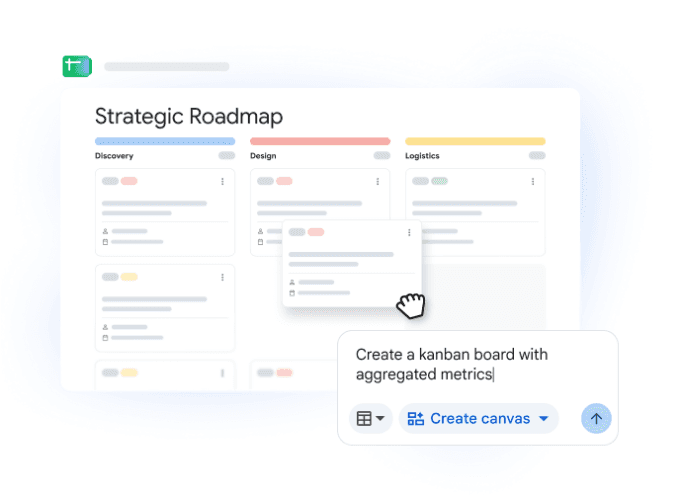
Sheets canvas can create interactive dashboards, Kanban boards, and other interfaces that read and update spreadsheet data. It currently requires an eligible Workspace or Google AI plan and works in English on a computer; access follows spreadsheet sharing.

For your team: Try both interfaces with the people who will maintain the records. Choose the data relationships, access model, and deployment option that fit the workflow.

Explore App Builder
Google Sheets canvas Kanban example on the official product page
Google’s public Sheets canvas illustration, captured October 20, 2026. View source

Include Workspace you already pay for

Teable

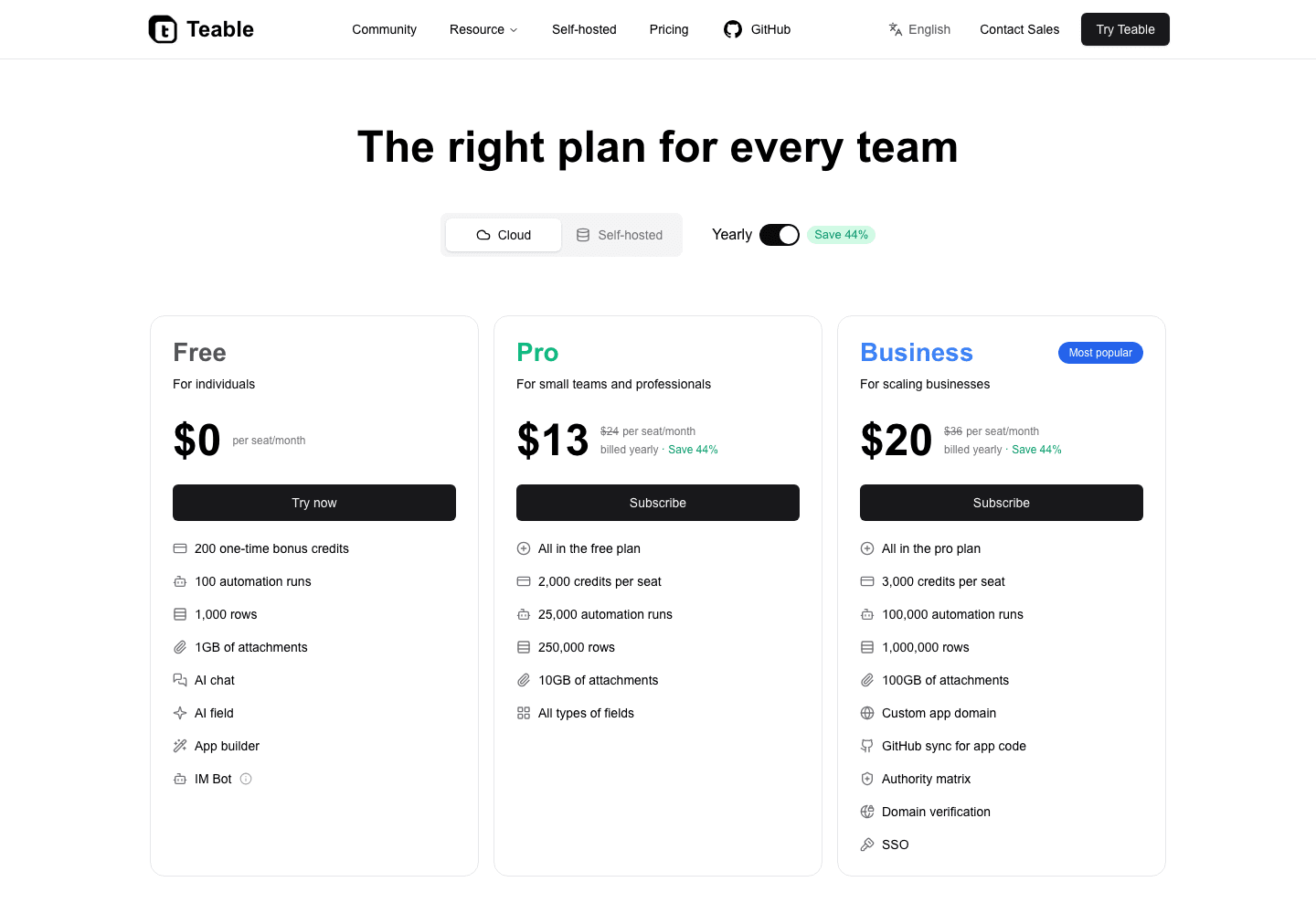
Teable Cloud Pro is USD 13 per seat/month billed annually; Business is USD 20. Business includes 1M rows per space, 100K automation runs per space/month, and 3,000 AI credits per seat.

Google Sheets

Anyone with a Google Account can create a sheet. Workspace subscriptions bundle multiple tools, while Gemini feature availability depends on the plan. Apps Script can also support existing integrations and automation.

For your team: Compare the additional seats, AI usage, workflow maintenance, and migration work for the same process. A Workspace subscription you already use can change the cost of keeping Sheets.

Review Teable plans
Teable annual cloud plans and usage allowances
Teable global cloud plans billed annually, in USD, captured October 20, 2026. View source

Start with one complete workflow

Import one customer dataset and review it with the team before changing the rest of the workflow.

Google Sheets and file import guide
01

Bring over the data

  1. 1Choose Google Sheets in the Teable import menu, connect your Google account, and select the spreadsheet and tabs to import. CSV or Excel export is another route.
  2. 2Review the import report, field types, record counts, and customer identifiers. Empty tabs and columns beyond 300 per tab are skipped. Values that do not match the inferred field type are not imported; correct and fill them in using the report.
02

Rebuild and try the workflow

  1. 1Rebuild record relationships, views, permissions, apps, and the required automation.
  2. 2Keep useful Apps Script or Workspace processes until their replacements are working. Validate a full customer follow-up with its users.

Import brings data into Teable; it is not an ongoing two-way sync. Spreadsheet formulas, Apps Script code, sharing rules, and canvas layouts need separate configuration or continued use in Sheets.

Sources and comparison date

Based on public product documentation checked on October 20, 2026. Refer to current plan details for availability and quotas.

Questions about moving from Google Sheets

Does Google Sheets already have AI?

Yes. Gemini can help create, edit, and analyze spreadsheets. Available features depend on the Google Workspace or Google AI plan; compare the features your team can actually use.

Can Sheets provide an interface beyond the grid?

Yes. Sheets canvas can create interactive interfaces, including Kanban boards and dashboards, that read and update data. It currently works in English on a computer with an eligible plan, and uses the spreadsheet’s access permissions.

Can I import directly from Google Sheets?

Yes. Connect your Google account, select the spreadsheet, and choose its tabs in Teable’s import flow. Review the import results and field mappings. CSV and Excel exports are also supported.

Will formulas and scripts move with the data?

Treat those as separate work. Rebuild the needed formulas and automation in Teable, or keep the existing Sheets process. A data import does not recreate Apps Script or establish continuous synchronization.

Build a shared app for customer operations

Connect customers, orders, and follow-up work in one data workspace.

github logoreddit logoXyoutube logolinkedin logo