
Teable is now on your phone.Get the app
CompareLovable Alternative

A Lovable alternative for business operations

Compare Teable as a Lovable alternative for business operations. Review native databases, app editing, GitHub sync, seat versus credit billing, and migration.

Free cloud plan available. AI credits and usage quotas apply.

Teable vs Lovable: what changes for your team

Both products can build apps with AI and store data. The decision is where the team starts and does its daily work: a shared business-data workspace or a custom software project.

Starting point

TeableLinked business records, views, and team apps

LovableA web-app project generated and refined through chat

Data backend

TeableRelational tables managed in the workspace

LovableCloud includes Postgres, authentication, storage, and functions

Record editing

TeableShared table views plus generated application interfaces

LovableEditable Cloud database view and the application you build

Code access

TeableApp code editing and download; GitHub sync on Cloud Business+

LovableOwned project code and two-way GitHub sync

Billing model

TeableSeats with plan allowances for automation and AI

LovableWorkspace credit pool with unlimited members

Deployment

TeableCloud or self-hosted; self-hosted App Builder Business+

LovableManaged hosting, with code export for external deployment

Lovable workspace credits and Teable paid seats use different billing units; compare the complete workflow. View sources

Choose the workspace the team will maintain

Teable

Teable gives the team a place to manage linked customers, orders, and service requests. App Builder adds focused interfaces around those records, while views and AI fields remain available for daily operations.

Lovable

Lovable is a full-stack app builder. Its Cloud backend includes a database, authentication, storage, and functions; the database view also supports inline record editing. You can build custom operational tools there too.

For your team: Choose Teable when the shared record workspace is central to the workflow. Keep Lovable when the product experience and application code are the main things you want to design.

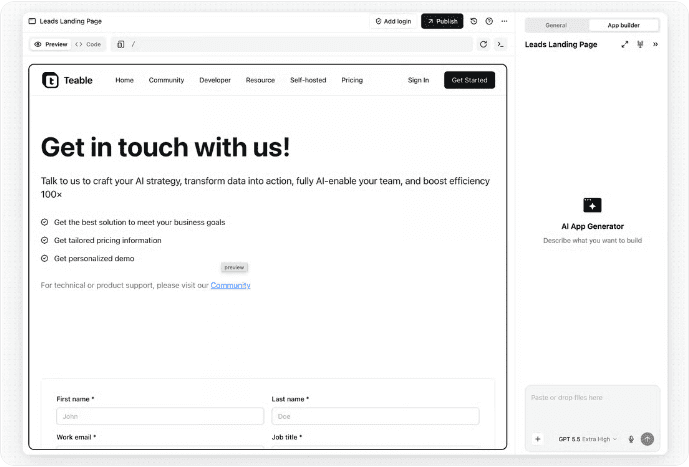
Explore Teable App Builder
Teable App Builder editor in the official documentation
Teable App Builder documentation image, captured October 20, 2026. View source

Keep control of the app as it evolves

Teable

Teable App Builder supports code editing and ZIP download. Cloud Business and above can sync an app with GitHub. Self-hosted App Builder requires Business or above.

Lovable

Lovable supports two-way GitHub sync and external deployment of exported code. You own the project code; the managed Cloud backend and app services still need their own migration plan if you change hosts.

For your team: For either product, decide who will maintain the app, data permissions, and integrations after launch. Existing code and a working deployment can be good reasons to keep the current application.

Explore data workflows

Compare seats with the whole workspace credit pool

Teable

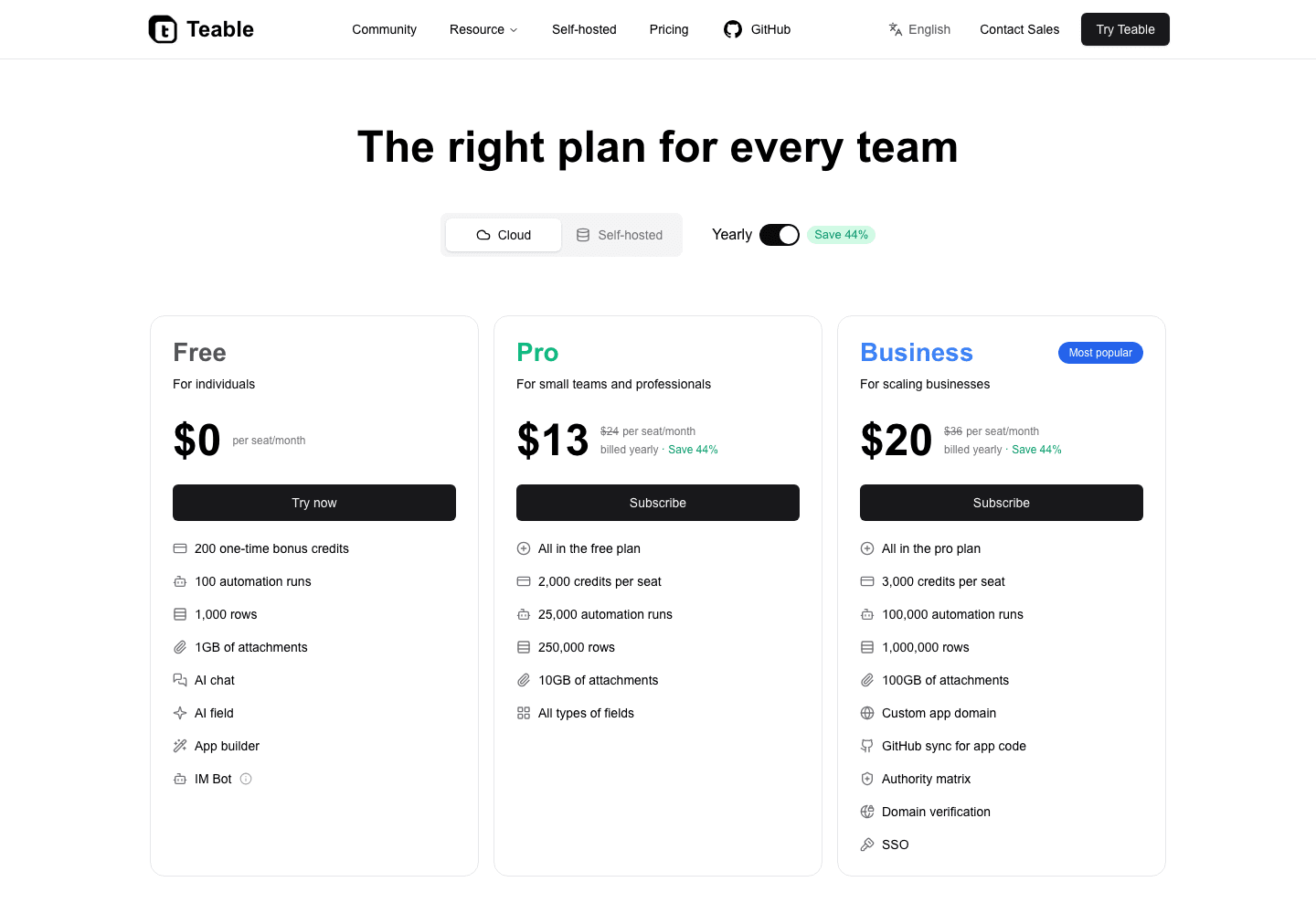
Teable Cloud Pro is USD 13 per seat/month billed annually; Business is USD 20. Business includes 100K automation runs per space/month and 3,000 AI credits per seat.

Lovable

Lovable plans do not charge per member. Unlimited workspace members share credits used for building, running Cloud apps, and in-app AI, with included grants depending on the plan. Credit consumption varies by action and plan.

For your team: Estimate the people maintaining records, the app-building work, traffic, AI usage, and hosting. A single workspace subscription and a per-seat data plan are different cost models.

Review Teable plans
Teable annual cloud plans and usage allowances
Teable global cloud plans billed annually, in USD, captured October 20, 2026. View source

Start with one complete workflow

Start with one business dataset and one daily workflow, while keeping the current app available.

CSV and Excel import guide
01

Bring over the data

  1. 1Export the required Cloud database tables as CSV, or export them from the backend used by your Lovable app. Keep stable IDs that connect related records.
  2. 2Import into Teable and review field types, row counts, relationships, and files that need separate transfer.
02

Rebuild and try the workflow

  1. 1Build the required app interface, data access rules, integrations, and automation around the imported records.
  2. 2Test the workflow with its users before switching traffic or retiring the old app. Keep useful components where they are.

CSV moves records. Authentication accounts, storage files, backend functions, secrets, and application code need separate treatment; importing data does not recreate the Lovable application.

Sources and comparison date

Based on public product documentation checked on October 20, 2026. Refer to current plan details for availability and quotas.

Questions about moving from Lovable

Does Lovable include a native database?

Yes. Lovable Cloud includes a managed Postgres database, authentication, storage, and functions. Its database view lets you browse and edit records. An external database is not required for every Lovable app.

Can I keep my application code?

Both products offer code access. Lovable supports GitHub sync, and Teable supports app code download plus GitHub sync on Cloud Business and above. Moving hosting also requires planning for the backend and integrations.

Is Teable always cheaper than Lovable?

No. Teable uses paid seats and plan allowances, while Lovable uses shared workspace credits and unlimited members. Compare build work, runtime, AI usage, and the number of people maintaining the data.

Can I import my existing records?

Yes. Export the relevant tables as CSV and import them into Teable. Rebuild relationships and application behavior, and handle user accounts, storage, functions, and credentials separately.

Build a team app around your business records

Start with customers, requests, or orders, then give the team a focused interface for daily updates.

github logoreddit logoXyoutube logolinkedin logo