CompareAppSheet Alternative

An AppSheet Alternative for Connected Operations

Connect inventory, suppliers, and purchase orders in Teable, then build an app around them. Give warehouse and purchasing teams one place to maintain the records behind their work.

Free cloud plan available. AI credits and usage quotas apply.

Teable vs AppSheet at a glance

Teable combines a database workspace with AI app building. AppSheet builds applications on supported data sources and includes offline mobile workflows. For inventory teams, the deciding factor is often desk-based coordination versus work in the field.

Data workspace

TeableLinked tables with direct editing, views, and apps

AppSheetApps on Google Sheets, AppSheet databases, and supported sources

Related records

TeableLinked records across inventory, suppliers, and orders

AppSheetReference columns between app tables

App creation

TeableAI-generated apps around workspace data

AppSheetGemini-assisted creation on paid AppSheet plans; app editor

Offline work

TeableOnline collaboration in a shared data workspace

AppSheetOffline app use with background sync

Automation

TeableRecord-based automations and AI fields

AppSheetBots, expressions, app events, and scheduled automation

Starting cost

TeableCloud Free plan with quotas; paid plans as needs grow

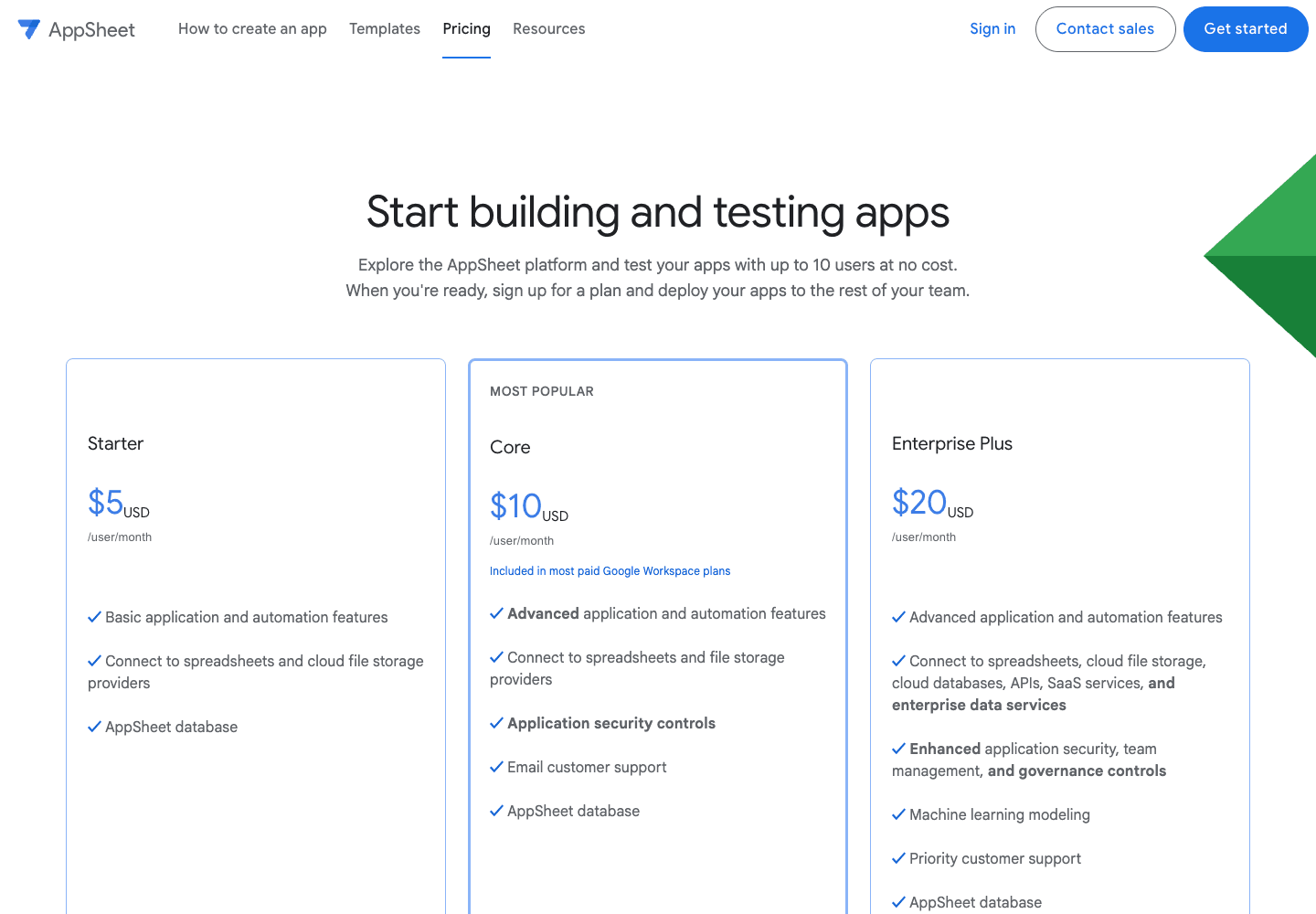
AppSheetFree app testing; Core included in many paid Workspace plans

AppSheet Core is included in many paid Google Workspace plans. Offline behavior and existing licenses can matter more than a feature count. Product sources

Connect warehouse updates to the purchasing record

Teable

Use linked tables for items, suppliers, purchase orders, and receipts. A receiving app can capture a delivery while purchasing works from the related order and outstanding quantities. The team can also update and review those records directly in Teable.

AppSheet

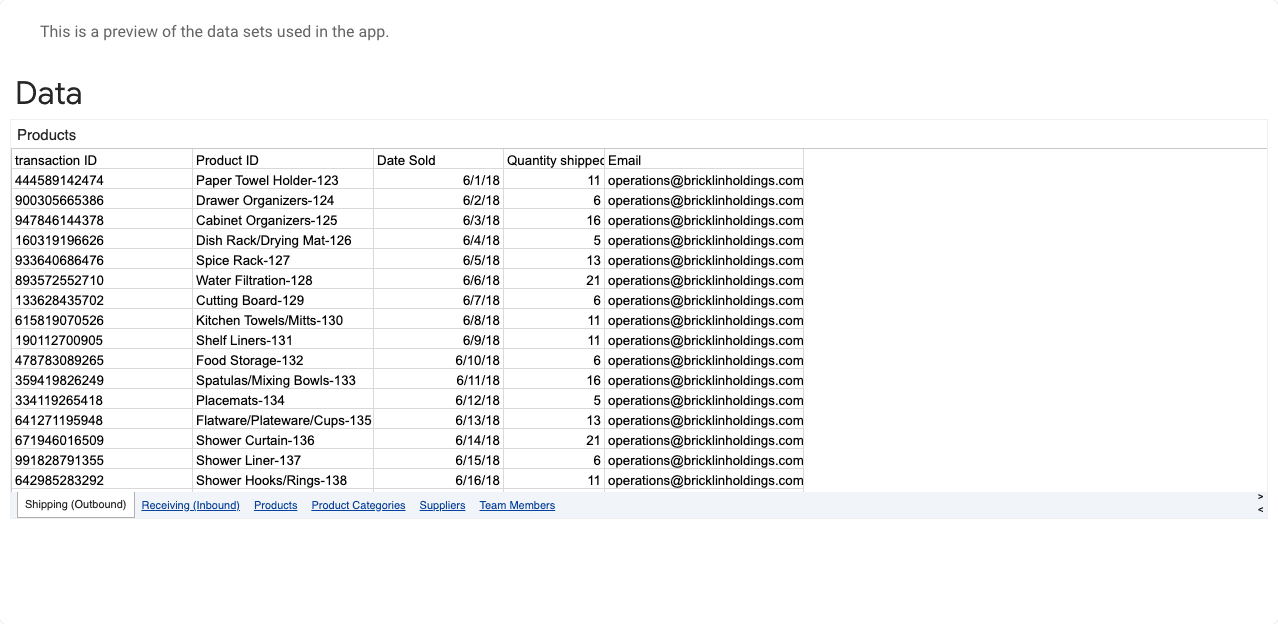
AppSheet turns supported data sources into apps and connects tables through references. Its public inventory template illustrates stock updates and related inventory records. It is a useful approach when the app is the team’s primary way to interact with the data.

The practical difference Choose Teable when several teams need both a shared data workspace and focused apps for their part of the process.

Explore Teable AI App Builder
AppSheet public inventory template data table
Public inventory template data on AppSheet, captured October 15, 2026. View source

Make offline requirements part of the choice

Teable

Teable suits a workflow where staff collaborate on shared records and use apps around them. AI fields can classify supplier notes or summarize receiving exceptions so purchasing has useful context beside the order.

AppSheet

AppSheet supports offline use with background sync, along with forms and device data collection. Those capabilities matter for warehouses, inspections, and field work where connectivity is unreliable.

The practical difference Keep AppSheet for a process that depends on offline collection unless a replacement has passed the same device and connectivity requirements.

Build a workflow in Teable

Include the licenses your team already owns

Teable

Teable’s Free cloud plan provides a starting point for a small workflow. Paid allowances cover larger data and usage needs. Self-hosted App Builder requires Business or higher, alongside your own infrastructure.

AppSheet

AppSheet Core is included in many paid Google Workspace plans. App testing is separate from deployment to the wider team; advanced sources and governance depend on the selected plan.

The practical difference An included Workspace entitlement can make staying with AppSheet economical. Teable’s value is the shared database-and-app workflow, not an assumed license saving.

Compare Teable cloud and self-hosted plans
AppSheet pricing page showing test and deployment options
Captured from the official public website on October 15, 2026. View source

Moving from AppSheet to Teable

Start with one workflow. Import the records, then recreate the app behavior around them before inviting the wider team.

Read the Teable connection and import guide
Step 1

Prepare and import the records

  1. 1Export the underlying spreadsheets or database tables you are authorized to access. Record key columns, references, virtual columns, expressions, actions, and bots separately.
  2. 2Import CSV or Excel into Teable. Review field types and rebuild links using stable record IDs.
  3. 3Compare record counts, totals, dates, and a sample of attachments against the original.
Step 2

Rebuild and validate the workflow

  1. 1Recreate a receiving flow and test an approved order, a partial receipt, and a duplicate entry. Validate phone and connectivity requirements before deciding to replace field apps.
  2. 2Test with the actual user roles. Check that people can only view and change the intended records.
  3. 3Agree on a cutover, reconcile late changes, and enable the new workflow after the team signs off.

Exported files transfer data. Review formulas, attachments, access rules, and integrations separately; they may need to be rebuilt.

Sources and comparison date

Product documentation and public pages reviewed October 17, 2026. Screenshots captured October 15, 2026 from official public pages; plan details may change.

AppSheet alternative FAQ

Is Teable an AppSheet alternative?

Yes, for online inventory, requests, approvals, and business apps centered on shared records. AppSheet remains a strong candidate when offline mobile collection or existing Workspace entitlements drive the decision.

Can Teable replace offline AppSheet apps?

Teable is designed for online data operations and web apps. Keep AppSheet for field workflows that require offline capture and synchronization after connectivity returns; use Teable for the connected inventory and purchasing work around them.

Can I keep my Google Sheets data?

You can export the required sheets to Excel or CSV and import them into Teable. Decide which system becomes the source of truth. Importing a file does not create continuous two-way synchronization.

Is AppSheet already included in Workspace?

Core is included in many paid Google Workspace plans. Ask your administrator to check the exact edition and users covered before comparing additional software costs.

Can I start with Teable for free?

Yes. The cloud Free plan includes AI Chat, AI Field, and App Builder with usage limits and a one-time bonus credit allowance. See the pricing page for current quotas and upgrade options. View Teable plans

Can I self-host the app builder?

Teable supports self-hosting. App Builder requires a self-hosted Business plan or higher. Include the license, infrastructure, backups, and AI-provider usage when evaluating the deployment.

Connect your inventory workflow in Teable

Start with items, suppliers, and orders. Build a receiving app on the same records your purchasing team maintains.

github logoreddit logoXyoutube logolinkedin logo
© 2026 Teable AI, Inc.