2 tasks are done, 3 are in progress, 2 are in review, and 3 are planned.
Your next priorities
Finish the landing page: Olivia is polishing it for Sep 21.
Review customer onboarding: Alex needs your sign-off by Sep 22.
Approve social assets: Daniel's visuals are ready for review.
Would you like a checklist grouped by owner?
Thinking
6.2s
Hold to talk…
Smart Medium
Trusted by teams at
Launch video
What you can do from your phone
Pick up where you left off
Start a chat with Cuppy at your desk and finish it on your phone. No syncing, no setup.
9:41
AllAppsRoutine
🚀Product Launch
A smoother customer onboarding
This week's priorities
Launch readiness
🤝Client Relationships
Prepare for the client kickoff
Client follow-up ideas
Pipeline at a glance
✍️Content Studio
Ideas for our next product demo
Turn ideas into a brief
September content plan
Launch readinessReply finished
9:41
Launch readinessProduct Launch
What should we focus on before launch?
Cuppy
Here's your launch snapshot. 🚀
2 tasks are done, 3 are in progress, 2 are in review, and 3 are planned.
Your next priorities
Finish the landing page: Olivia is polishing it for Sep 21.
Review customer onboarding: Alex needs your sign-off by Sep 22.
Approve social assets: Daniel's visuals are ready for review.
Would you like a checklist grouped by owner?
6.2s
Hold to talk…
Smart Medium
Say it, and Cuppy does it
Ask Cuppy what needs your attention today, or have it update records, write a report or summarize a file. Type or hold to talk, and attach a photo, PDF or spreadsheet when you need to.
9:41
New productsProduct Launch
How many new products came in this week?
Cuppy
24 new products came in this week from 5 suppliers. All of them have stock and a price set.
3.1s
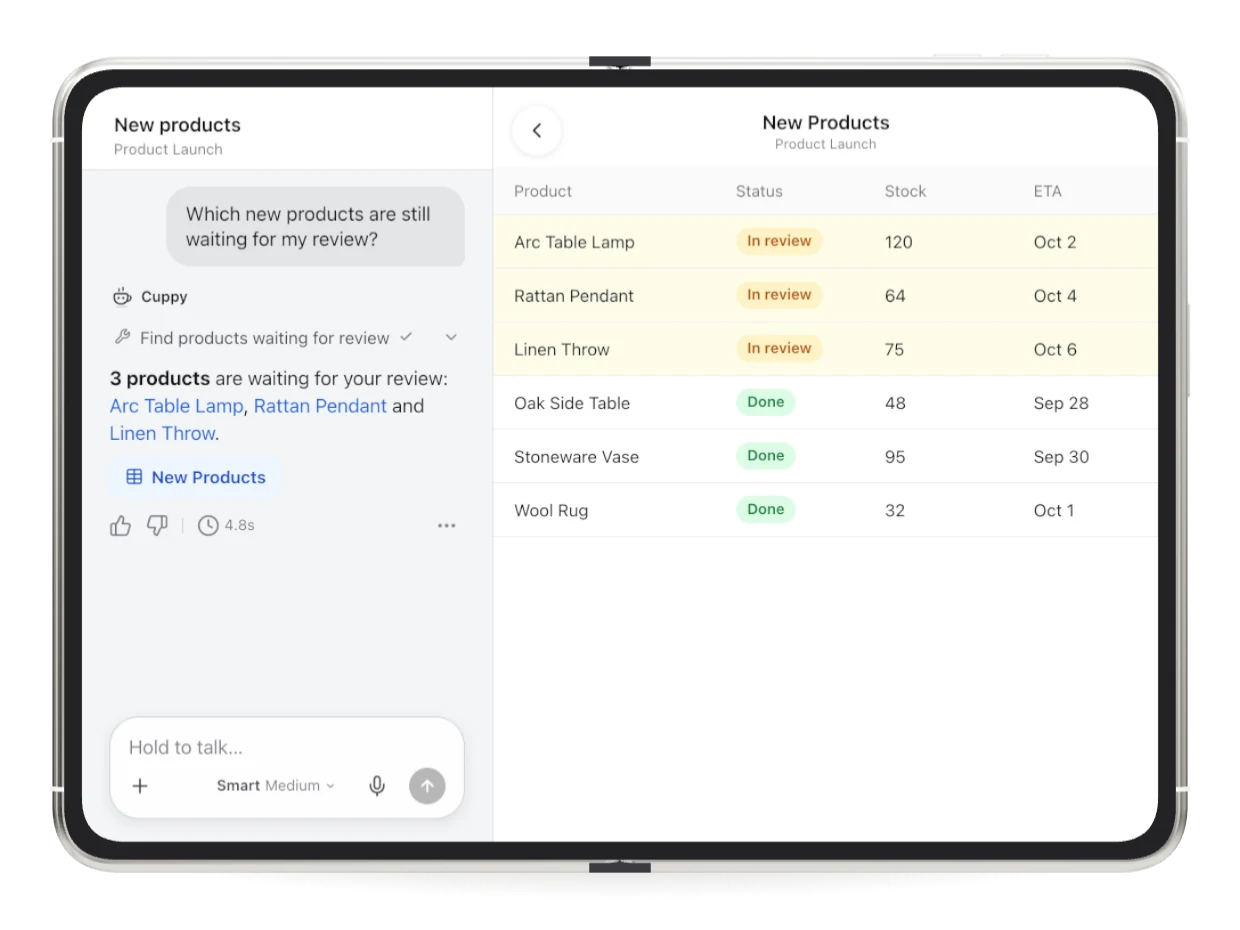
Which new products are still waiting for my review?
Cuppy
Find products waiting for review
3 products are waiting for your review: Arc Table Lamp, Rattan Pendant and Linen Throw.
4.8s
Approve the lamp, then write my weekly report.
Cuppy
Approve Arc Table Lamp
Add weekly report to Reports
Done. Weekly report is in Reports.
7.3s
Hold to talk…
Smart Medium
qwertyuiop
asdfghjkl
⇧zxcvbnm⌫
123spacereturn
Release to transcribe, slide up to cancel
Build and update apps on the go
Describe the app or page you need, preview it, then publish it and share the link from your phone.
9:41
Launch HubApp chat · v2
Add a readiness page: stock, reviews, overdue.
J
App builder
Read Launches and New Products
Add Readiness page with three charts
Build preview
Added a Readiness page: 22 of 24 ready, 2 reviews pending, nothing overdue.
Launch HubUpdated
View app
38s
Hold to talk…
Smart Medium
9:41
OverviewReadinessProducts
Launch readiness
22/24ready
Stock gaps0
Pending reviews2
Overdue0
PreviewLive
Back to chat
Launch HubPublished v2
Publish changes
Share
Open in browser
Access link
Custom domain
Access link
https://launch-hub.teable.app
Copy linkEdit prefix
Hand it off and get on with your day
Teable notifies you when a task finishes or Cuppy needs your answer, so you don't have to keep the app open. Your scheduled routines keep running too.
9:41
Friday, October 239:41
New productsnow
Done. Weekly report is in Reports.
Q4 supplier updatenow
Should I also update the ETA for the 3 delayed SKUs?
Morning digestnow
Done. 4 new leads and 2 overdue tasks.
Made for iPad and iPhone Duo
On iPad or an unfolded iPhone Duo, Teable splits into two columns, with your projects on the left and your work on the right. Open a table from a chat, and the chat stays right beside it.
Everything you built on the web, in your pocket
Same data, same permissions. Open any part of your workspace from your phone.
Tables and records
Open any table and edit records. Ask Cuppy without leaving the table.
ProductStatusStock
Arc Table LampIn review120
Rattan PendantIn review64
Linen ThrowIn review75
Oak Side TableDone48
Arc Table Lamp
StatusIn review
OwnerOlivia Chen
ETAOct 2
Hold to talk…
Dashboards
Check the numbers before a meeting, wherever you are.
Revenue this week$56,200+18%
Automations
See every run. When one fails, hand it to Cuppy to look into.
Today 9:41Success
Yesterday 18:03Failed
Yesterday 14:20Success
Hold to talk…
Routines
Change what a routine does or when it runs, pause it, or run it now.
Weekly reportOct 23, 05:00 PM
RepeatWeekly
Every Fri at 17:00
Run now
Each run opens its own conversation under Routines.
AllAppsRoutine🚀 Product Launch
Weekly reportjust now
Morning digest5 h ago
Weekly report7 d ago
Connectors
Connect Gmail, Slack, Outlook and about 1,500 more apps right from a chat.
+ about 1,500 more
SkipConnect GmailCuppy needs access to your Gmail account to go on.Connect
Cuppy
Gmail is connected. Drafting the 12 follow-up emails now.
Team
Invite people by email or link and choose their role.
By emailInvite link
maya@northstar.exampleEmails, separated by space or return
RoleCreator ⌄
Send invitations
Members · 3
J
Jordan Lee (me)jordan@northstar.example
Owner
O
Olivia Chenolivia@northstar.example
Editor ⌄
D
Daniel Brooksdaniel@northstar.example
Editor ⌄
M
Maya Patelmaya@northstar.example
Creator ⌄
FAQ
Which devices does it support?
iPhone and iPad with iOS or iPadOS 16.4 or later, and Android phones and tablets. On iPad, an unfolded iPhone Duo or a large Android tablet, it opens in two columns.
Can I create an account in the app?
Not on iPhone or iPad yet. Sign up on the web first, then sign in with the same account.
How much does it cost?
The app is free to download. It uses the same account, plan and AI credits as Teable on the web.
Will my team see the same data?
Yes. The app uses your Teable account and the same permissions as the web, so everyone sees only what they can see there.
What does the app send to AI?
What you write to Cuppy, the files and photos you attach, your voice when you use voice input, and the project data Cuppy reads to finish a request. The app shows this before you start.
Does it work offline?
You can see recently loaded chats and projects offline, but making changes needs a connection.
Is there an Android app?
Yes, it's on Google Play for Android phones and tablets.
Can I use it with a self-hosted Teable?
Yes. Tap Change server on the sign-in screen and enter your server's HTTPS address. Your server needs a recent version of Teable.
Is voice input a live conversation?
No. Hold to talk turns your voice into text, and you can edit it before sending.
Get started in two steps
1
Create your Teable account
Sign up free on the web. Already have an account? Skip to step 2.