
Teable is now on your phone.Get the app
CompareJira Alternative

A Jira alternative for business operations

Compare Teable as a Jira alternative for business operations. Review connected records, Scrum planning, native AI, automation usage, and Jira Cloud migration.

Free cloud plan available. AI credits and usage quotas apply.

Teable vs Jira: what changes for your team

For teams evaluating Jira Cloud, Teable offers a business-data workspace with apps around the records. Jira’s work-item model supports both business and software teams, with dedicated tools for agile delivery.

Core structure

TeableRelated business tables, records, and views

JiraWork items, spaces, boards, and workflows

Software delivery

TeableCustom views and apps for an operational process

JiraBacklogs, sprints, releases, and agile reports

Connected information

TeableRelationships between business records

JiraLinked work items and development-tool integrations

Native AI

TeableAI Chat, AI fields, and App Builder

JiraRovo AI on paid Cloud plans; capabilities vary by tier

Automation units

TeablePlan allowances for automation runs

JiraOrganization-pooled automation step allowances

App configuration

TeableBuild interfaces around the data workspace

JiraConfigure work-item fields, workflows, and Marketplace apps

Jira features and migration here refer to Jira Cloud. Software-delivery tools and a business-data workspace serve different daily workflows. View sources

Keep software delivery and business records in focus

Teable

Teable can link a customer to service requests, assets, and orders, with a view for each operational team. App Builder creates an interface around the same records. It fits workflows where the business data is the main thing people maintain.

Jira

Jira provides backlogs, sprint planning, releases, and agile reporting, with links to development tools. It also supports business workflows through configurable work items, fields, and transitions.

For your team: Keep Jira when its software-delivery model is central to the team. Choose Teable for a connected operational dataset, or use it alongside the development process you already trust.

Explore Teable App Builder
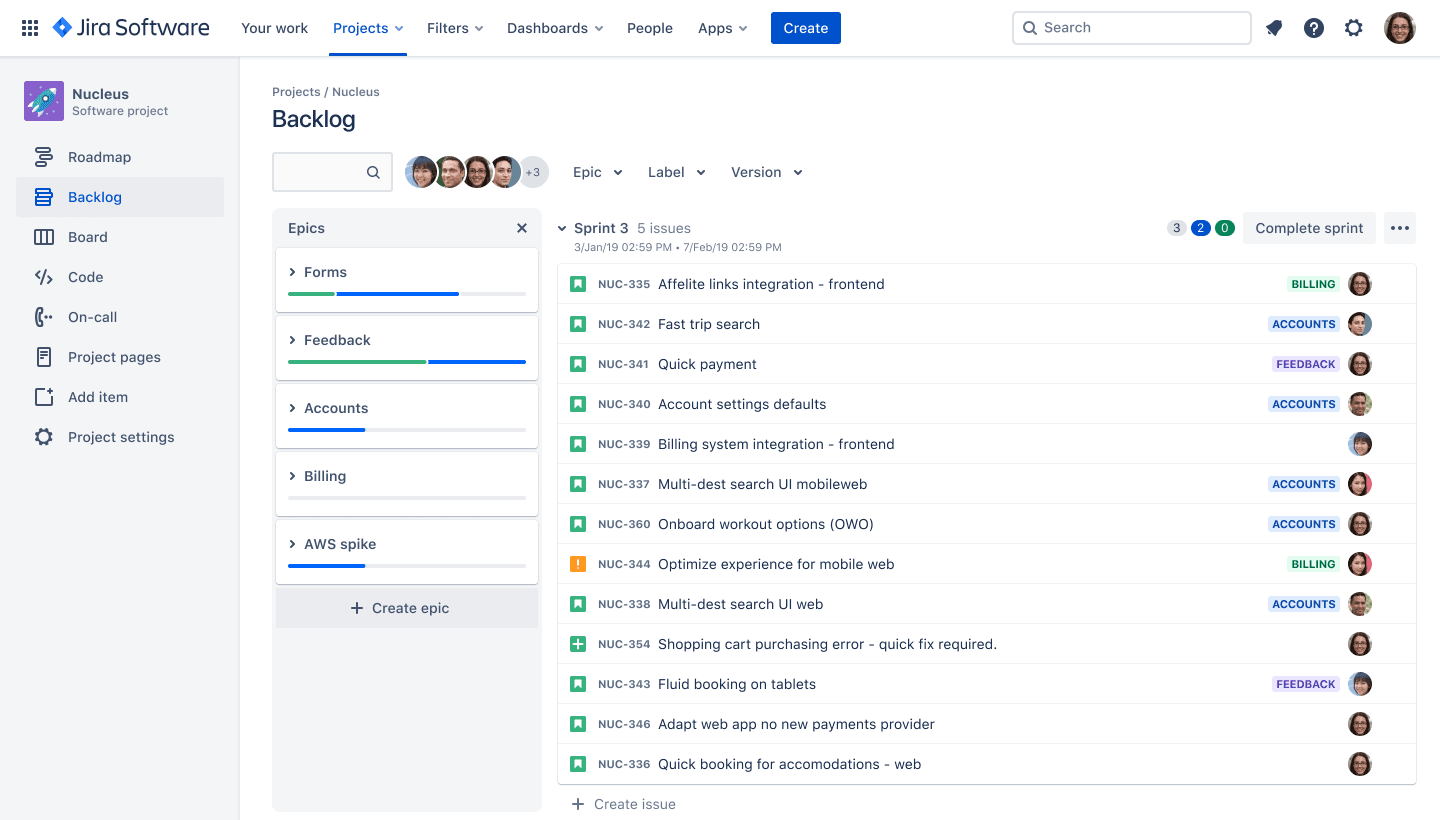
Jira official Scrum template screenshot showing a backlog
The backlog in Atlassian’s public Jira Scrum template, captured October 20, 2026. View source

Compare AI within the complete workflow

Teable

Teable combines AI Chat, AI fields, and App Builder with shared tables. For example, teams can classify incoming requests, maintain related customer records, and give operators a focused app. Teable supports cloud and self-hosted deployment; self-hosted App Builder requires Business or above.

Jira

Jira Cloud offers Rovo AI on paid plans, with usage allowances and advanced capabilities depending on the tier. AI-assisted search, chat, and automation work within the Atlassian environment.

For your team: Choose based on where the team maintains context and completes its next action. Existing developer integrations, permissions, and workflow configuration can be good reasons to keep Jira.

Explore Teable workflows

Compare seats and the work each automation performs

Teable

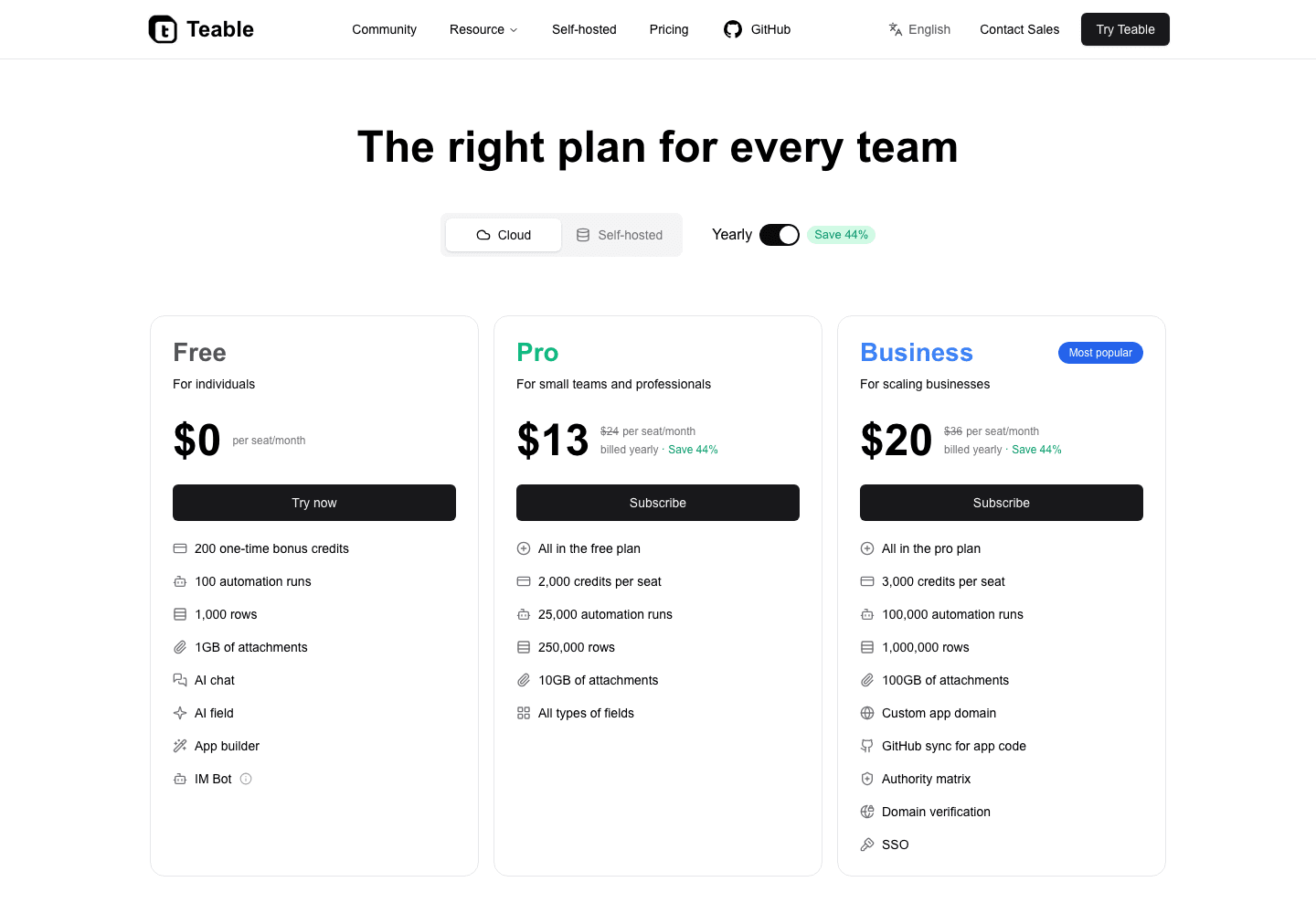
Teable Cloud Pro is USD 13 per seat/month billed annually; Business is USD 20. Business includes 100K automation runs per space/month and 3,000 AI credits per seat.

Jira

Jira Cloud plans vary in planning, AI, permissions, and support. Atlassian’s current automation model pools step allowances at organization level; triggers, conditions, actions, branches, and loops can each contribute steps.

For your team: Estimate the people using the system, Marketplace apps, AI, and the actual steps in your workflows. One automation run is not equivalent to one metered step, so headline counts do not determine the total cost.

Review Teable plans
Teable annual cloud plans and usage allowances
Teable global cloud plans billed annually, in USD, captured October 20, 2026. View source

Start with one complete workflow

Start with one authorized Jira Cloud project and verify its records before expanding the migration.

Jira migration guide
01

Bring over the data

  1. 1Open the target Teable project, launch AI Chat, type /, and select Connect Everything. Provide the Jira Cloud site URL, account email, and an API token authorized for the selected project.
  2. 2Ask Teable AI to migrate the accessible work items, fields, statuses, relationships, and supporting data. Compare counts and inspect representative comments and attachments.
02

Rebuild and try the workflow

  1. 1Recreate the views, permissions, automations, and app behavior needed by the team; handle Jira rules and Marketplace data separately.
  2. 2Test the workflow with its users before switching. Revoke a migration-only API token when the work is complete.

Migration coverage follows Jira API access and account permissions. Jira automation rules, Marketplace app data, dashboards, and permission schemes may need separate handling. Keep the existing project available until the team has verified the result.

Sources and comparison date

Based on public product documentation checked on October 20, 2026. Refer to current plan details for availability and quotas.

Questions about moving from Jira

Should a software team replace Jira with Teable?

Keep Jira when Scrum backlogs, sprints, release planning, agile reporting, and development integrations are essential. Teable is a useful option for operational records and apps around customers, requests, orders, or assets.

Does Jira Cloud already include AI?

Yes. Paid Jira Cloud plans include Rovo AI, with allowances and advanced capabilities depending on the plan. Teable combines AI with its data workspace and app-building workflow.

Can Teable connect directly to Jira Cloud for migration?

Yes. Use Connect Everything in AI Chat with the authorized Jira Cloud URL, account email, and API token. It can migrate API-accessible data; permissions, rules, dashboards, and Marketplace data still need their own migration checks.

Are automation counts directly comparable?

No. Teable plan allowances count automation runs, while Atlassian’s current model counts executed automation steps pooled across the organization. Estimate the actions in your real workflows before comparing costs.

Build one operational workflow around connected records

Start with a customer, request, or asset process while keeping your software delivery workflow running.

github logoreddit logoXyoutube logolinkedin logo