
Simple Client CRM Template
From lead to closed, faster. The all-in-one CRM for quoting and automation.
What is this client CRM template
Simple Client CRM is a complete, ready-to-run sales system — not a blank contacts table you have to build up yourself. The moment you copy it into your workspace, you get a structured pipeline, a working quote generator, a product catalog, and follow-up automations that are already wired together, so a small team can start logging leads and sending quotes in minutes instead of designing a CRM from scratch.
In practice, everything hangs off the Leads table, where each lead carries a 7-stage Status from New to Closed-won, an Estimated value, and an Activity Timeline for call notes. When a deal warms up, the Quote Generator app builds the document for you — pulling line items from the Products table and your branding from the My Company table, totaling subtotal, tax, and total, then exporting a branded PDF. Two automations, Sent Quotation and New lead - Admin Alert, handle the follow-up so nothing slips.
It's built for freelancers, consultants, agencies, and small sales teams who have outgrown tracking deals in an inbox or a spreadsheet. Use it exactly as it ships, or treat the pipeline stages, product catalog, and quote layout as a starting point you reshape to match how you actually sell.
What's inside
Four connected pieces that cover the whole sales cycle — capturing a lead, tracking the deal, sending the quote, and following up automatically. No blank-page setup: the pipeline stages, the quote document, and the automations are already wired together.
Leads
Your sales pipeline as a table. Every lead carries a 7-stage status (New through Closed-won/Closed-lost), an estimated deal value, contact details, and an activity timeline. Quotes link straight back to the lead they belong to.
- 7-stage pipeline from New to Closed-won / Closed-lost
- Estimated value on every lead, ready for pipeline reporting
- Activity Timeline keeps call notes next to the deal
- 'Get in touch' form view lets leads submit themselves
Quote Generator
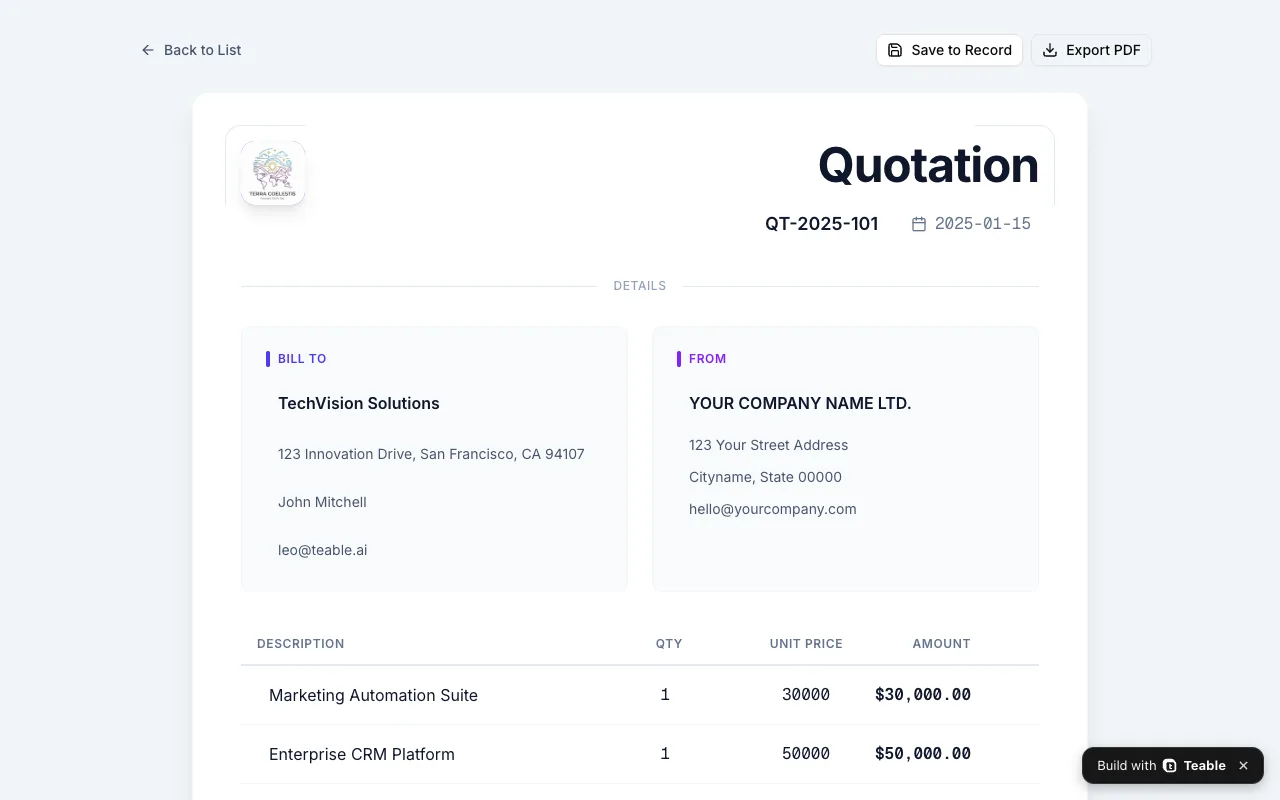
A working quoting tool, not a spreadsheet row. Pick a quote, edit Bill To and line items pulled from your Products table, watch subtotal, tax, and total add up — then export a branded PDF or save it back to the record.
- Status tabs: Draft, Sent, Accepted, Rejected at a glance
- Line items pulled from your own product catalog
- Subtotal, tax rate, and total calculated as you edit
- Export PDF to send, Save to Record to file it
Products & My Company
The two tables that make quotes yours. Products is your catalog — name, SKU, unit price, category, active flag. My Company holds your logo, address, and closing message, so every quote goes out under your brand.
- 8 sample products across Software, Hardware, and Service
- Unit prices feed straight into quote line items
- Your logo and address stamped on every quotation
- Toggle products Active to retire them without deleting
Follow-up automations
Two workflows ship with the base. One sends the quotation when it's ready; the other alerts an admin the moment a new lead arrives — so a hot lead never sits unnoticed over the weekend.
- 'Sent Quotation' delivers the quote without manual email
- 'New lead - Admin Alert' pings you the moment a lead lands
- Built on Teable automations — edit triggers in plain English
Every field a small sales team actually uses
The Leads table ships with ten fields that cover a deal from first touch to closed. Rename them, add your own, or hide the ones you don't need — the structure is a starting point, not a straitjacket.
| Field | Type | What it's for |
|---|---|---|
| Name | Text | The contact's name — your primary handle on the deal. |
| Status | Single select | New / Qualification / Proposal / Evaluation / Negotiation / Closed-won / Closed-lost — the pipeline backbone. |
| Estimated value | Number | What the deal is worth — the input for pipeline totals and forecasting. |
| Company | Text | The account behind the contact. |
| Quotations | Link | Jumps to every quote you've sent this lead — the quote table stays in sync both ways. |
| Text | Where quotes and follow-ups go. | |
| Job Title | Text | Know if you're talking to the decision-maker. |
| Phone | Text | For the call that closes it. |
| Activity Timeline | Long text | A running log of calls, meetings, and next steps — no more 'what did we say last time?'. |
| Message | Long text | The lead's own words from the contact form — their needs, verbatim. |
Why teams pick this CRM
Most free CRM templates stop at a contacts table. This one keeps going — through the quote, the PDF, and the follow-up.
A real pipeline, not a tag list
Seven deal stages with estimated values, so 'how's the pipeline looking?' has a number for an answer.
Quotes in minutes, not hours
Pick products, set quantities, export a branded PDF. The quote is filed against the lead automatically.
Follow-ups that send themselves
The built-in automations deliver quotes and alert you to new leads — no Zapier bill, no forgotten follow-up.
Leads capture themselves
Share the'Get in touch'form and inbound leads land in the table with their message attached.
Deal values at a glance
Estimated value on every lead means pipeline totals are one summary away — no exporting to a spreadsheet.
Your brand on every document
Logo, address, and closing message come from the My Company table — quotes look like you, not like a template.
Who it's for
Anyone who sells to clients and has outgrown tracking deals in their head, their inbox, or a spreadsheet.
Freelancers & consultants
One person, many prospects. Keep every conversation and quote in one place, and look bigger than you are with polished PDF quotes.
Small sales teams
Share one pipeline instead of five spreadsheets. Everyone sees the same deal stages, values, and quote history.
Agencies & service businesses
Quotes are your bread and butter. Generate them from your service catalog and never retype a proposal again.
How to use this template
From zero to sending your first branded quote in about ten minutes.
- 1
Click "Use template"
The whole base — Leads, Quotes, Products, My Company, the Quote Generator app, and both automations — copies into your workspace. Free tier is plenty to start.
- 2
Make it yours
Open the My Company table and replace the sample record with your company name, logo, address, and closing message. This is what clients see on every quote.
- 3
Load your catalog
Replace the 8 sample products with what you actually sell — name, SKU, unit price, category. Deactivate anything seasonal instead of deleting it.
- 4
Add leads and send your first quote
Type leads into the grid or share the'Get in touch'form. When a deal warms up, open the Quote Generator, pick line items, export the PDF — the automation files it against the lead.
Make it yours with Teable AI
The template is the starting point, not the ceiling. Teable builds AI into every table — reshape the pipeline by describing it, pull your existing clients in, and let AI handle the follow-up. Four ways to turn this CRM into yours:
Reshape the pipeline stages
Status is a normal select field. Tell Teable AI the stages your team actually sells through and it rewrites the options — your views and reporting follow on their own.
Bring your existing clients in
Don't retype a single contact. Connect & Migrate pulls your current clients out of Excel or CSV and maps the columns onto the Leads fields for you.
Let AI read the inbound message
Every lead's Message holds their needs in their own words. Point AI at it and it writes a one-line brief onto the record, so Activity Timeline starts with context, not a blank.
Send follow-ups that write themselves
Business-aware email agents turn the data on each lead into a personal note. Nudge every open proposal without drafting the same email forty times.
Take this workflow further
Explore tools for adapting or expanding this template to fit your team.
Frequently asked questions
Is this CRM template really free?
Yes. The template copies into a free Teable workspace, and the free tier covers the Leads table, Quote Generator app, and automations for a small team. You only upgrade if you outgrow the row or attachment limits.
How does the Quote Generator work?
It's a Teable app connected to the Quotes and Products tables. Pick a quote, edit the Bill To details and line items (products and prices come from your catalog), and the subtotal, tax, and total update live. Export PDF gives you a branded document; Save to Record writes changes back to the table.
Can I change the pipeline stages?
Absolutely. Status is a single-select field — rename stages, add new ones, or trim it to the four you actually use. The views and your workflow adapt immediately.
How is this different from a spreadsheet CRM?
Three ways: leads link to their quotes instead of living on separate tabs, the Quote Generator produces real PDF documents from your data, and automations send quotes and alerts without you touching anything. A spreadsheet can hold the data; it can't do the work.
Can leads submit their own details?
Yes — the'Get in touch'view is a shareable form. A lead fills in their name, company, contact details, and message, and the record lands in your Leads table (and triggers the new-lead alert).
What happens when I outgrow it?
Keep going. Add tables for contracts or invoices, build a dashboard app for pipeline reporting, or use Teable's API to sync with your other tools. The template is a starting base, not a ceiling.
Related templates
Close your next deal with it
Duplicate Simple Client CRM into your workspace and send your first branded quote today.


