

How to vibe code an app people can actually use
With an AI app builder, you can now describe a web app and get its screens. That's vibe coding, and it works: in an afternoon you can have pages that look and click like a finished product.
But a web app isn't ready for real users until everything behind the screens works too. It has to be deployed and hosted, sit on a domain, keep its data in a database, let people log in, send email, run jobs on a schedule and recover from mistakes. That part usually takes far longer than the screens, and it's what this guide covers.
- Describe the app. Say who uses it, what they do and what should happen next, the way you'd explain it to a new hire.
- Click through every screen. Ask for changes in plain words until each page does what you need.
- Check what's behind the screens. Deployment, hosting, a domain, a database, user login, file storage, email, scheduled jobs, API keys, AI, an admin dashboard and backups. The list below covers each one.
- Try it as a real user. Sign up, add a record, upload a file and check that the email arrives.
- Publish it. Then send the link to the people who will use it.
Step 3 is where most of the work is. Below is everything a vibe-coded app needs, the tools people usually set up for each one, and what Teable takes care of.
| A real web app needs |  Teable |
|---|---|
| DeploymentGitHub, plus Vercel or Netlify | ✓One click |
| HostingVercel, Netlify, Render or a cloud server | ✓Included |
| DomainA domain registrar and DNS settings | ✓Your own domain |
| DatabaseSupabase, Firebase or PostgreSQL | ✓Built in |
| User loginSupabase Auth, Clerk or Auth0 | ✓Built in |
| File storageAmazon S3 or Supabase Storage | ✓Built in |
| EmailResend, SendGrid or Postmark | ✓Built in |
| Scheduled jobsCron jobs or a job queue | ✓Automations |
| Integrations and API keysA key per service, stored as secrets | ✓1,500+ connectors |
| AIAn OpenAI or Anthropic account and API key | ✓No API key needed |
| Admin dashboardRetool, or one you build | ✓Your tables |
| Backups and recoveryDatabase backups you set up and test | ✓Trash, history, rollback |
In Teable, every item on this list comes with the app.
0. In Teable, there's one step
Describe the app you need the way you'd explain it to a new hire: who uses it, what they do and what should happen next. Teable builds the pages, the tables, the login and the automations together.
Then: Click Publish.
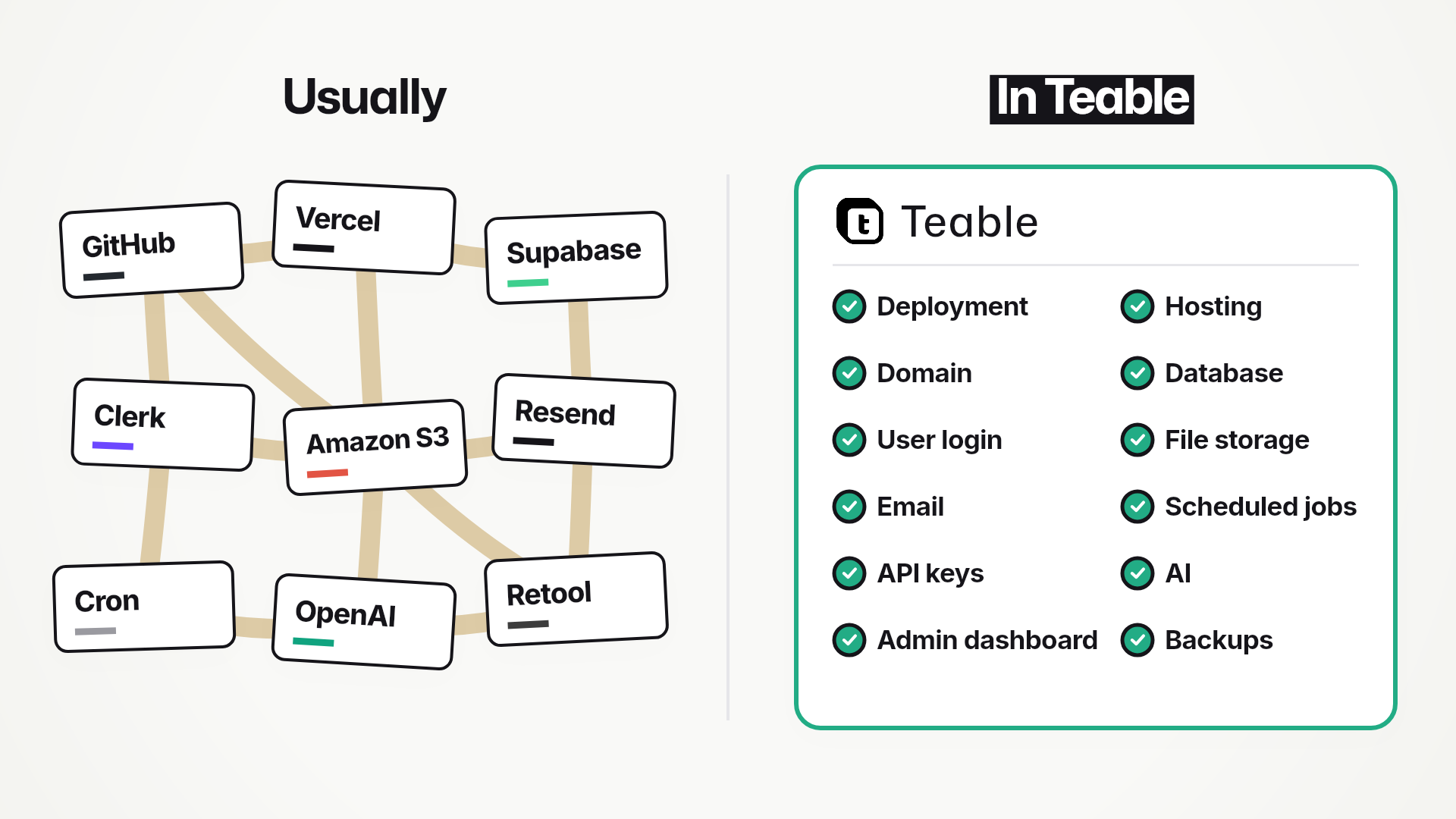
Here are the 12, one by one: what each takes if you set it up yourself, and how Teable already handles it.
Deployment is putting your app on the internet so other people can open it.
Technically, that means building the code into a production version, uploading it to a server with the settings and keys it needs, and switching visitors to the new version without breaking the one that's live.
Doing it yourself:
- Get the code out of your vibe coding tool and push it to GitHub.
- Connect the repository to Vercel or Netlify and set up the build.
- Copy every secret, like the database address and API keys, into the host's settings.
- Read the build logs and fix whatever breaks.
- Keep a test version apart from the live one, so half-finished changes never reach users.
In Teable: Click Publish.
Teable's AI app builder prepares the deployment, builds the app and creates a published version at its own link. Before that, you can edit the preview directly, or point at part of a page and tell AI what to change. Whatever you change after that is kept as a draft: the live app keeps serving the last published version until you click Publish changes, so users never see half-finished work. Every published version stays in the version history, and you can roll back to an earlier one. If a build fails, Auto fix collects the error details and has AI fix them.
Hosting is where your app runs, day and night, so it's there whenever someone opens it.
For a real app that means servers that run its code and serve its pages, a home for its data, a network that delivers it quickly wherever users are, and protection against traffic spikes and attacks. Someone also has to keep all of it patched, watched and running.
Doing it yourself:
- Pick a provider and a plan.
- Watch the usage limits as more people use the app.
- Keep the server and its software patched.
- Work out why the app is down when it goes down.
In Teable: Nothing to set up.
Teable runs on Amazon Web Services in the United States, which hosts the platform, your data and its backups. Cloudflare's global network sits in front for DNS, content delivery and DDoS protection, and apps are hosted on Vercel. Teable's team keeps it all patched, and errors and performance are monitored with Sentry. Teable is GDPR compliant, and every provider is listed in its Trust Center.
A domain is your app's web address, like app.yourbusiness.com.
Connecting one means buying it from a registrar, adding DNS records that point it at your host, waiting for them to take effect, and making sure the address serves your app securely.
Doing it yourself:
- Buy the domain from a registrar.
- Add DNS records that point it at your host.
- Wait for the records to take effect, then check the app loads at the new address.
- Fix it when it doesn't.
In Teable: Publish, and the link is ready.
On the Business plan, you can also put the app on your own domain. Enter the domain and Teable shows you the exact DNS records to add at your DNS provider. Click Verify DNS, and Teable checks the records and binds the domain to your app. A subdomain, like app.yourbusiness.com, works best. If your DNS is on Cloudflare, set the record to DNS only.
The database is where your app keeps its data: users, orders, bookings.
Behind that are tables, fields and the links between them, a secure connection from the app, rules for who can read and change what, backups, and keeping it all fast as the data grows.
Doing it yourself:
- Sign up for Supabase or Firebase and create a project.
- Design the tables and how they link to each other.
- Connect the app with a connection string and keys.
- Write rules so each user can only read their own data.
- Find a way for your team to look at the data and fix it.
In Teable: Already built in.
Teable creates the tables, fields and links as it builds your app, on PostgreSQL, a widely used open-source database. Your data is encrypted in transit and at rest, and production databases are backed up, with restore procedures in place. Your team works with the same tables in Teable's online database, like a spreadsheet, so checking or fixing a record needs no code. You can bring in data you already have from Excel, collect new records with forms, and archive old records so they stop counting toward your row limit.
User login lets people create an account, sign in and see only their own things.
Behind it are sign-up and sign-in flows, verified email addresses, sessions, single sign-on for companies, and the rules that decide who may sign up and what each person can reach.
Doing it yourself:
- Add a login service like Clerk, Auth0 or Supabase Auth.
- Set up the sign-in emails, and make sure their links point to the live app, not a preview.
- Decide who is allowed to sign up.
- Write the rules that keep each user's data to themselves.
In Teable: Switch it on.
Login is built into every app. You only choose two things:
- How people sign in: a code sent to their email, Google, a Teable account or your company's single sign-on (SSO).
- Who can get in: anyone, people with your company's email domain, or only people on your list.
Every user is a record in a table you can see and edit, and your data is read on Teable's side, so the key never reaches anyone's browser. It's what a client portal or an employee portal needs.
File storage keeps what people upload: photos, PDFs, signed forms.
It's usually object storage kept apart from the database, with rules for who can open each file and a link from each file to the record it belongs to.
Doing it yourself:
- Set up a storage service like Amazon S3 or Supabase Storage.
- Decide who can open each file.
- Link each file to the right record in the database.
- Keep an eye on storage as files pile up.
In Teable: Add an attachment field.
An uploaded file is stored on the record it belongs to, the booking, the order or the person, and kept with the rest of your data, encrypted in transit and at rest. Your team opens it straight from the table, or downloads them all at once.
Apps send email all the time: sign-in codes, confirmations, receipts, reminders.
Sending it reliably takes an email delivery service, a verified sending domain so messages don't land in spam, a template for each email, and code that sends each one at the right moment. When it breaks, it breaks quietly: confirmations stop going out, and nobody notices until a customer asks.
Doing it yourself:
- Sign up for an email service like Resend, SendGrid or Postmark.
- Verify your sending domain so your emails don't land in spam.
- Write each email, and the code that sends it at the right moment.
- Check now and then that emails are still going out.
In Teable: Say when to send it.
Teable delivers the email for you, with no email service to sign up for, and sends sign-in codes on its own. For everything else, tell Teable when an email should go out, like when a booking is confirmed, and it becomes a Send email step in an automation. Automations run separately from the app's pages, so changing a page never breaks the emails behind it.
Some work has to happen without anyone clicking: tomorrow's reminders, a Monday report, a follow-up three days after someone signs up.
In code, that's a cron job or a background worker with a queue. Someone has to keep it running, retry it when it fails and make sure it never runs twice.
Doing it yourself:
- Set up a cron job or a background worker.
- Keep it running, and restart it when it stops.
- Make sure a job never runs twice, or gets skipped.
In Teable: Create an automation.
- It starts: at a time you set, when a record is created or changed, when a webhook is received, or when an email arrives.
- Then it: creates or updates records, sends email, calls another service with an HTTP request, or runs a script.
- It runs on: Teable's servers, so it keeps going when your laptop is closed.
- AI too: AI tasks can run on a schedule, like a summary every Monday morning.
Sooner or later your app needs to talk to other services, like Slack, Gmail, HubSpot or Google Sheets.
Each connection needs an API key or an OAuth app, stored as a secret outside the code, and replaced when it expires or leaks. A key left in the code (easy to do when you vibe code) can be read by anyone who gets hold of it.
Doing it yourself:
- Create an API key or an OAuth app in each service.
- Store each key as a secret on your host, never in the code.
- Replace keys when they expire or leak, and redeploy.
In Teable: Connect it once.
Teable's connectors cover over 1,500 apps. Connect an account once, then grant it to the app or automation that needs it. Keys stay on Teable's side and never appear in your app's code. If you replace a key, the published app redeploys itself to use the new one. AI tools like Claude can work with your data too, through MCP.
If your app writes, summarizes or reads documents, it needs an AI model behind it.
That means an account with a model provider, an API key kept secret, and limits so usage can't run away.
Doing it yourself:
- Sign up with OpenAI or Anthropic and add a card.
- Keep the API key secret.
- Watch usage, so one busy day doesn't bring a surprise bill.
In Teable: Just describe it.
Tell the builder the AI feature you want, like a summary or a chat. Teable connects your app to AI and manages the key, so there's no API key or separate AI account. It works the same in preview and in the published app, and usage comes out of your space's Teable credits.
Someone on your team has to see what users did, fix a wrong entry and answer "where's my booking?"
That's an internal admin panel: its own login, permissions for each role, and screens that stay in step with the app's data.
Doing it yourself:
- Build a separate admin area, or set up a tool like Retool.
- Give it its own login and permissions.
- Keep it in step every time the app changes.
In Teable: Open your tables.
The tables behind your app are the admin dashboard. Filter, sort and edit records like a spreadsheet, save a view for each job, look up any record's change history, and add a dashboard for the numbers. Invite teammates with the role they need: Owner, Creator, Editor, Commenter or Viewer, and they can work from their phone with the Teable mobile app.
Sooner or later, something gets deleted that shouldn't have been. In July 2025, during a vibe coding experiment, Replit's AI deleted the live database behind an app SaaStr founder Jason Lemkin was building (The Register).
Recovery takes regular database backups, a tested way to restore them, and a history of changes so you can undo one mistake without rolling back everything else.
Doing it yourself:
- Turn on database backups, and check they actually run.
- Practice restoring one before you need to.
- Keep old versions of your app's code you can go back to.
In Teable: Restore it from the trash.
Deleted records, fields and tables go to the trash first and can be restored. Every record keeps its change history, and app changes can be rolled back to an earlier version. Underneath, Teable backs up its production databases, with restore procedures in place.
Step 0 is the whole job: describe the app, click Publish, and items 1 to 12 come with it. Or start from one of the templates, each a working app you can change.


